
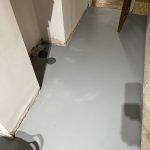
Light Patches After Sanding
Sometimes, the surface of the microcement can look quite patchy after sanding. This is especially noticable in darker colours, where the light dust from the sand stands out against the darker background.
The guide below explains more about why it happens and how to be sure it won’t be visible in the final finish.
Why Does My Microcement Surface Look Patchy After Sanding?
This does happen sometimes, especially when sanding darker colours, the dust that is created by the sander leaves a residue on the surface.
This isn’t usually a problem as the patches will even out when you seal the surface.
Remove Dust
Before sealing the surface, give it a good hoover out to remove all the dust from the surface.
It’s best not to use a wet cloth to remove dust as this can mark the surface in some cases.
Seal the Surface
Once the sealer is applied, the colour will even out to be more in line with the intended colour.
How Can I Be Sure It’s Not Going to Stay Patchy?
You can test it by wetting it in a discreet corner. If the colour evens out when wet, that is how you can expect the surface to look & stay once sealed.
Just make sure the Microcement is fully dry again before you seal it.